
With over 1300+ HubSpot integrations now available on Integrately, choosing the right integrations can feel overwhelming. To help you build a powerful tech stack that actually moves the needle, we surveyed marketing professionals and HubSpot power users to identify the most impactful integrations for 2025 and beyond.
Before diving into specific tools, it’s important to understand that the most sophisticated HubSpot users don’t rely solely on native reporting. While HubSpot excels as a system of record, advanced business intelligence requires layering specialized tools on top.
Common HubSpot reporting limitations:
The solution: Treat HubSpot as your data foundation, then use specialized BI tools to unlock deeper insights. This approach allows you to maintain HubSpot’s operational strengths while gaining analytical superpowers.

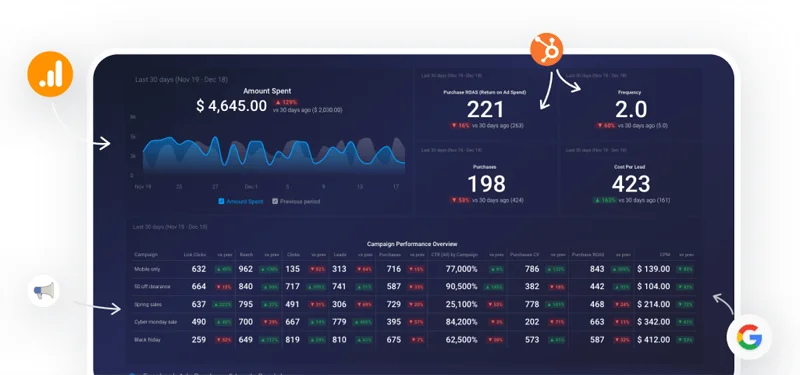
Why it’s essential: HubSpot is great for tracking basic metrics—but once you want cross-object reporting or deeper forecasting, its reporting starts to fall short. That’s where Databox comes in. It layers advanced analytics on top of your HubSpot data, so you can create smarter dashboards, track real revenue trends, and forecast with confidence.
The core problem it solves: As revenue operations experts point out, “Cross-object reports are really hard to not only create, but also to display. Even with the capabilities that you do have in your native CRM… you’re going to have to create four or five or six reports in order to create the number of sessions, the number of leads, the number of MQLs, the amount of closed-won deals.”
Advanced BI capabilities beyond HubSpot:
Real-world applications from revenue experts:
What users love about it: “HubSpot is the system of record… and Databox is the system of insight,” explains Databox’s CEO. Users consistently praise how it transforms complex data relationships into clear, actionable insights that drive real business decisions.
Best for: Revenue operations teams, marketing leaders, and executives who need sophisticated analysis beyond HubSpot’s native capabilities—especially those dealing with long sales cycles, complex attribution, or cross-platform reporting needs.
Quick setup: Connect HubSpot + Databox in 1-click
Why it’s essential:
Integrately empowers you to automate HubSpot with zero coding & it’s specifically designed for ease-of-use. With 1-click automation templates tailored for HubSpot, you can connect HubSpot to thousands of apps and build powerful workflows in just a few minutes.
Key capabilities:
What users love about it:
“Integrately saved us hours every week. We no longer need to involve developers for every small automation,” says one marketing manager. The visual automation builder and prebuilt HubSpot recipes make it a breeze to set up complex workflows—without feeling like you’re coding.
Real-world applications:
Best for:
Small to mid-sized teams that want to automate processes quickly, without hiring developers or spending hours building zaps from scratch.
Related read: https://integrately.com/blog/hubspot-integrations
Integrate HubSpot with 1300+ apps in 1-click.
Why it’s essential: This cloud-based phone system transforms how sales teams handle calls by providing context and automation directly within HubSpot.
Key capabilities:
What users love about it: The system eliminates administrative overhead while providing sales reps with immediate context about every caller. This leads to more personalized conversations and better outcomes.
Best for: Sales teams that rely heavily on phone communication and want to streamline their calling processes.
Quick setup: Connect HubSpot + Aircall in 1-click
Why it’s essential: ClickUp creates seamless workflows between your HubSpot customer data and internal project management.
Key capabilities:
What users love about it: When a lead submits a form, ClickUp can automatically create a task for your marketing team with all the relevant HubSpot data included. This ensures nothing falls through the cracks and teams stay aligned.
Best for: Growing businesses that need to coordinate between sales, marketing, and operations teams.
Quick setup: Connect HubSpot + ClickUp in 1-click
Why it’s essential: The integration creates a closed-loop system for social media advertising and lead nurturing.
Key capabilities:
What users love about it: You can create highly targeted Facebook campaigns using your HubSpot data, then automatically nurture those leads through email sequences—all while tracking ROI in one place.
Best for: Businesses investing in social media advertising who want to maximize their ad spend effectiveness.
Quick setup: Connect HubSpot + Facebook Lead Ads in 1-click
Why it’s essential: Drift acts like having a sales team on your website around the clock, dramatically increasing lead conversion rates.
Key capabilities:
What users love about it: “By using Drift we have significantly increased our leads,” reports one marketing professional. The two-way integration means conversations flow naturally into your existing nurture sequences.
Best for: Businesses with high website traffic who want to capture and qualify more leads.
Quick setup: Connect HubSpot + Drift in 1-click
Why it’s essential: PandaDoc eliminates the time-consuming process of creating professional sales documents while maintaining accuracy.
Key capabilities:
What users love about it: “It couldn’t be simpler and has reduced the amount of time it takes to create important documents by hundreds of hours monthly,” says one agency owner.
Best for: Sales teams that frequently create proposals, contracts, and quotes.
Quick setup: Connect HubSpot + PandaDoc in 1-click
Why it’s essential: The integration provides end-to-end visibility from ad click to customer conversion.
Key capabilities:
What users love about it: “Not only can we use these insights to optimize our paid search channels, but we can also create a more personalized and tailored experience for each user,” explains one marketing director.
Best for: Businesses running Google Ads who want to optimize their campaigns based on actual customer behavior.
Quick setup:
Why it’s essential: Hotjar reveals how your HubSpot contacts actually interact with your website, enabling data-driven optimization.
Key capabilities:
What users love about it: “We use this to determine whether someone is a marketing-qualified lead or a sales-qualified lead by asking questions,” shares one software company founder.
Best for: Marketing teams focused on conversion rate optimization and user experience improvement.
Why it’s essential: Typeform brings conditional logic and visual appeal to lead generation forms that standard HubSpot forms can’t match.
Key capabilities:
What users love about it: “Not only can you take users down different paths of questions depending on how they’ve replied, but you can also direct them to different thank you pages or destinations post-form-fill,” explains one marketing professional.
Best for: Businesses that want to create sophisticated lead qualification processes with engaging user experiences.
Quick setup: Connect HubSpot + TypeForm in 1-click
Why it’s essential: This AI-powered tool analyzes your HubSpot email engagement data to send emails when each contact is most likely to open them.
Key capabilities:
What users love about it: “It doesn’t just make work easier; it makes work better,” notes one business consultant. The tool requires minimal setup but delivers measurable improvements in email performance.
Best for: Businesses with large email lists who want to maximize email engagement without manual optimization.
Why it’s essential: Slack creates instant communication channels around your HubSpot activities, ensuring nothing gets missed.
Key capabilities:
What users love about it: “With the integration, Slack enables instant notifications about new projects or tasks on HubSpot. It’s an indispensable tool for my team,” shares one marketing director.
Best for: Remote teams and businesses that need instant communication around customer activities.
Quick setup: Connect HubSpot + Slack in 1-click
Why it’s essential: Vidyard enables video personalization that can be tracked and measured within your HubSpot workflows.
Key capabilities:
What users love about it: “Dynamic lists with prospects who did or didn’t watch a video make sure everyone gets the follow-up they need,” explains one marketing professional.
Best for: Sales and marketing teams that want to add video personalization to their outreach and nurture campaigns.
Why it’s essential: Wistia provides professional video hosting with built-in lead generation and analytics that integrate seamlessly with HubSpot.
Key capabilities:
What users love about it: “The value is in being able to build and track video campaigns as if it were just another component of the built-in HubSpot suite,” says one marketing director.
Best for: Businesses that use video as a core part of their marketing strategy and want professional hosting with lead generation capabilities.
Quick setup: Connect HubSpot + Wistia in 1-click
When selecting HubSpot integrations, consider these key factors:
Most of these integrations can be set up directly through Integrately. Start with one or two that address your most pressing needs, then gradually expand your integration stack as you see results.
Remember, the best integrations are the ones that solve real problems for your business. Don’t add tools just because they’re popular – choose the ones that will genuinely improve your team’s efficiency and your customer experience.
The key to success with HubSpot integrations is starting small, measuring results, and building a connected ecosystem that serves your unique business needs. With the right combination of tools, you can transform HubSpot from a CRM into the central nervous system of your entire business operation.
Related read: https://integrately.com/blog/how-to-connect-hubspot-with-integrately


 #1 Highest rated integration platform for non-techies
20 Million+ ready automations
3x-10x less expensive
#1 Highest rated integration platform for non-techies
20 Million+ ready automations
3x-10x less expensive