Stop wasting time on scheduling-related admin tasks. Learn how to connect OnceHub with your work management tools using Integrately. Automate your CRM updates, marketing lists, and team notifications instantly.
Your calendar is booked for the week—a client onboarding, a team review, and a crucial sales demo. OnceHub helps you book those meetings easily, but there’s more to do than just sending invites.
It continues across all your other essential apps:
Each of these powerful tools operates in its own silo, requiring you to manually connect the dots. Every manual update is a drain on your time and a risk for crucial details to get missed, slowing down the momentum you just created.
But what if all of that could happen automatically, the second a meeting is scheduled, completed, or even canceled?
By connecting OnceHub to your tech stack with Integrately, you create a seamless chain reaction.
The initial booking event automatically triggers the right actions in the right tools, at the right time. You move from a series of disjointed manual tasks to a single, automated workflow that powers your business.
This post shows you exactly how.
Integrating OnceHub isn’t just about convenience; it’s about transforming a standalone scheduling tool into a significant part of your sales, marketing, and service delivery operations.
When you connect OnceHub using Integrately, specific events (i.e. triggers) inside OnceHub automatically set off actions in your other applications. You are no longer just booking a meeting; you are kicking off an entire, perfectly sequenced business process without lifting a finger.
You can either spend your day copying and pasting data between apps, or you can let automation handle the administrative work so you can focus on building relationships and running your business. The choice is clear.
Key OnceHub events you can use as triggers include:
Based on these triggers, Integrately can perform countless actions. Let’s explore what this looks like in practice.
The Problem: Your CRM is your source of truth, but it’s only as good as the data inside it. Manually updating contact records after every call is slow and prone to error. You forget to log a call, misspell a name, or forget to update a deal stage, and suddenly your sales pipeline is unreliable.
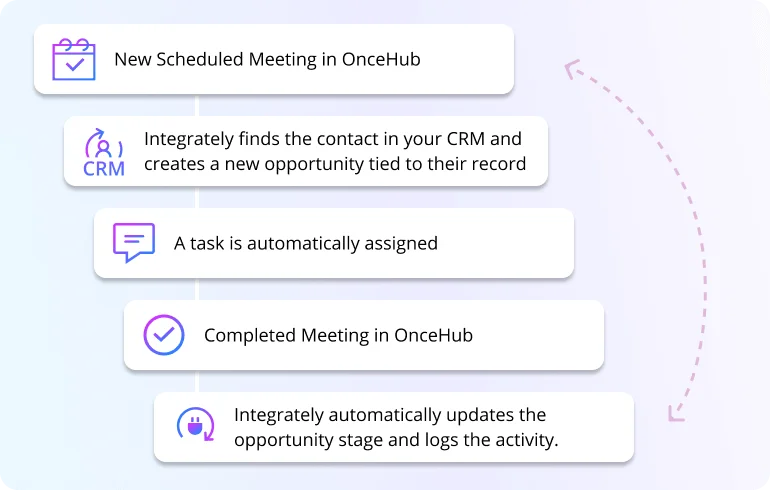
The Automated Solution: Instantly and perfectly sync all scheduling activity to your CRM. Imagine a prospect books a demo. Instantly, Integrately gets to work:
Then, after the call:
This automation also works in the other direction, ensuring that OnceHub always reflects the latest status from your sales pipeline. For example, if a deal falls through:
This isn’t a dream workflow; you can set it up in minutes.
The Problem: Someone who books a meeting is a highly qualified lead. But how do you make sure they are nurtured correctly? Manually exporting lists from OnceHub and importing them into your email marketing platform is a slow process that kills momentum.
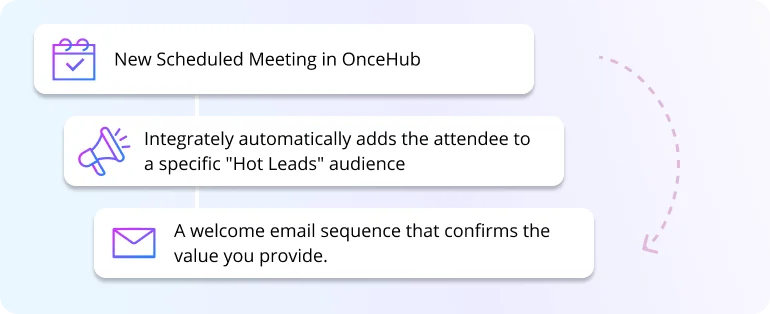
The Automated Solution: Use booking events to trigger personalized marketing campaigns. When a prospect schedules their first meeting, they are showing clear intent. Don’t let that interest fade.
What if they cancel? No problem. A Canceled Meeting trigger can automatically remove them from that sequence, so they don’t receive irrelevant emails.
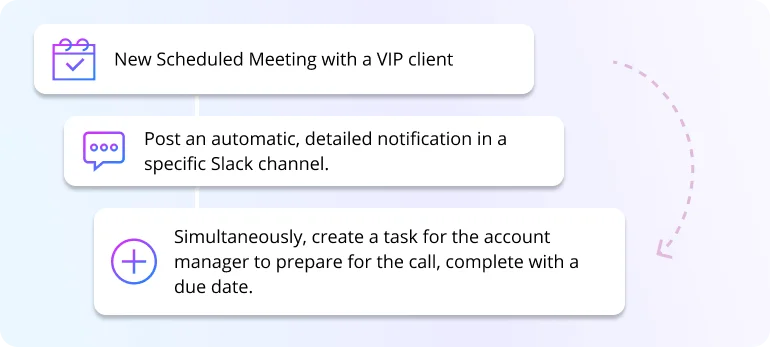
The Problem: Your sales team needs to know when a big demo is booked. Your customer success team needs a heads-up when a new client has their onboarding call scheduled. Relying on forwarded emails or manual messages in Slack is messy and inefficient.
The Automated Solution: Turn booking events into real-time notifications and project tasks. Keep your entire team in the loop without clogging their inboxes.
This ensures seamless handoffs and that everyone on the team has full visibility.
You invested in OnceHub to make scheduling easier. Now, it’s time to make your entire business process easier. By integrating OnceHub with the tools you already use, you eliminate manual data entry, ensure your data is always accurate, and create a seamless experience for both your team and your customers.
Stop letting manual tasks slow you down. Your first step is to automate your most common workflow. Pick one of the use cases above and see for yourself how simple it is.
You can find ready-to-use, 1-click automations for popular OnceHub workflows, connecting it easily with hundreds of other applications. Set up your OnceHub integration with Integrately today and start automating


 #1 Highest rated integration platform for non-techies
20 Million+ ready automations
3x-10x less expensive
#1 Highest rated integration platform for non-techies
20 Million+ ready automations
3x-10x less expensive